Alphington Grammar School
Alphington Grammar School is a leading independent, co-educational, non-denominational school offering education from ELC to Year 12. Located in Alphington on the banks of Darebin Creek, just 7 km from Melbourne’s CBD, Alphington Grammar offers private charter services exclusively for Alphington Grammar students.

Dear Alphington Grammar School Families,
Welcome to the new Alphington Grammar School Transport Parent Portal. This platform serves as your go-to hub for all the details regarding our bus routes, stops, and termly pricing. With useful features like the postcode checker to help you find the nearest stop, the portal is designed to make booking your child’s journeys to and from school as easy and convenient as possible.
We are delighted to partner with StudentRide and are committed to working closely together to ensure our Alphington Grammar families receive a top-tier, technology-driven transport management solution. This system enhances safety—our top priority—while also encouraging more families to use the service, contributing to a reduction in school-run emissions and traffic congestion.
Below, you’ll find a section dedicated to frequently asked questions (FAQs). If you have any further inquiries about the new service—whether it’s routes, stops, bookings, or anything else—please don’t hesitate to reach out to the StudentRide transport team at alphingtongrammar@studentride.com.au or contact the StudentRide helpdesk at 03 9000 4816 between 9am – 4pm. The live service team is always on hand during service times to deal with urgent inquiries.We’re here to assist!
Pricing details are available under the Terms and Conditions section, specifically within the Payments and Charges.
Yours Sincerely,
Alphington Grammar School
Routes, Timetables & Map
Here you will find the routes, stops, and times for Alphington Grammar School’s home-to-school bus service.

Frequently Asked Questions
Welcome to our FAQ section, where you’ll find a collection of frequently asked questions about our services.
If you can’t find the answer you’re looking for or need further assistance, feel free to contact a member of the StudentRide team by emailing alphingtongrammar@studentride.com.au or calling 03 9000 4816.
Our customer service team is available Monday to Friday between 9 am and 4 pm to assist you with non-urgent inquiries. The live service team are always on hand during service times to deal with urgent enquiries.
How do I register?
Simply click the register button on the portal home page, located in the top right corner. The portal will prompt you to enter your email address. For security reasons, this must match the email address registered with the school. You will then receive a One Time Passcode via text to your registered mobile number. Once you enter this code, you will be able to set up your password.
My email is not working when registering?
If your email address doesn’t match the one registered with the school, you won’t be able to proceed. Please contact the school at alphingtongrammar@studentride.com.au to update your details.
I didn’t receive a 6-digit code when registering my email?
If you don’t receive a code, it means your mobile number doesn’t match the records the school has on file. Please contact the school at alphingtongrammar@studentride.com.au to update your details.
Q: How do I make a regular booking for the term?
Use this if your child travels on the same days each week. In the app, tap the menu button (three lines, top left), then Make a regular booking. Choose your term, route, stop and travel days, then select morning, afternoon or both, and tap Book Now. To add the return trip, tap Additional Booking and repeat for the other time slot.
Q: How do I book a one-off trip?
Use this when your child needs the bus on a day they wouldn’t normally travel. In the app, tap the menu button, then Make an ad-hoc booking. Pick the dates and whether you need morning or afternoon, then confirm and check out.
Q: How do I cancel a single trip?
On the Home Dashboard, tap the cancel button (the no-bus icon) next to the journey. The driver’s list updates automatically.
Q: How do I cancel several days, or a date in the future?
Tap the menu button, go to Make an Ad-Hoc Booking, select Calendar, select your child, then the date or date range, and confirm.
Please cancel as early as you can. Telling your child’s teacher, or phoning the school office, doesn’t change the bus list. The School office can’t see or edit bus bookings.
Q: What are the cut-off times?
What you need to change | Book or cancel in the app by |
Afternoon travel today | 2.00pm today |
Morning travel tomorrow | Midnight tonight |
The app is available 24 hours a day and you can book or cancel in it any time. The cut-off is the point where the driver’s list is finalised. After it, we can’t guarantee the change reaches the driver.
Q: I’ve paid for a trip my child no longer needs.
Cancel the trip in the app first, so the bus isn’t held waiting, then contact us and we’ll talk you through what happens with the payment.
Where can I find the bus routes and timetables?
Bus routes and timetables can be found on this website. You can view each route in detail, including bus stops and departure/arrival times.
What if I would like an additional stop?
Our service is flexible, and we can add additional stops if there is sufficient demand and the proposed stop fits within the current routes. It’s always worth asking! Please contact us at alphingtongrammar@studentride.com.au for assistance.
What if I need different stops/routes during the week to accommodate my child’s regular travel?
If your child needs to travel on different routes, you can simply select the required routes for each day.
If they need to travel on the same route but use different stops, please contact alphingtongrammar@studentride.com.au, and we will assist you with this booking.
Q: What does the service cost?
Type of travel | Cost per student |
Term booking, morning and afternoon | $966 per term |
Ad-hoc booking, one trip | $12.08 |
A trip means one direction, so a return journey on the same day counts as two trips. An ad-hoc booking covers either the morning or the afternoon, not both. All prices include GST, so the price shown in the app is the price you pay. Payment is taken in the app at the time you book.
Q: When do I book, and for how long?
Bookings are made per term and cover both morning and afternoon travel. There’s no closing date to book by. You can book at any point in the term, and single ad-hoc trips can be booked one at a time if your child only travels occasionally. Everything is booked and paid for in the app.
Q: How do I cancel or give notice?
Bookings are made in advance for each term. If you cancel the service partway through a term, the full term fee still applies. The full terms are in the StudentRide app under Terms and Conditions.
What if I need to amend my travel arrangements before the start of term?
Please email alphingtongrammar@studentride.com.au and we will assist.
What should I do if the school bus is running late?
Our bus companies do their best to minimise delays, but sometimes factors beyond their control (such as roadworks) may cause disruptions. Please wait at your stop for 10 minutes after the scheduled pick-up time. If the school bus still has not arrived 10 minutes after the scheduled pick-up time, please contact StudentRide at 03 9000 4816.
What if my child misses the bus?
We recommend students arrive at the bus stop at least 5 minutes before the scheduled departure time. As a standard procedure, we ask that students do not wait in cars until the bus arrives. Buses will not depart before their allocated time, but if no one is waiting at the stop, the driver may proceed without stopping.
If your child does miss the bus, you will need to arrange their transportation to school yourself. Please inform the team at alphingtongrammar@studentride.com.au if this happens.
Cards for Boarding and Tracking
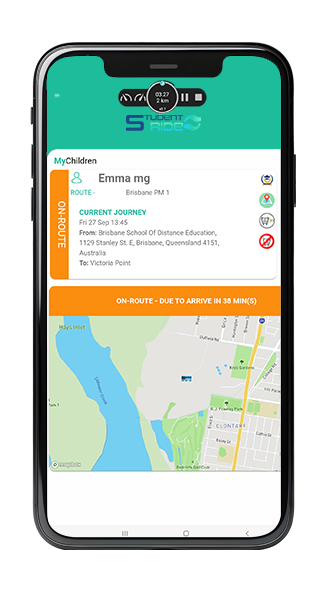
Students will be issued cards for seamless boarding and disembarking. These cards enable real-time tracking of your child’s journey to and from school.
Getting in Touch
If you need further assistance, feel free to contact a member of the StudentRide team by emailing alphingtongrammar@studentride.com.au or calling 03 9000 4816.
Our customer service team is available Monday to Friday between 9 am and 4 pm to assist you with non-urgent inquiries. The live service team is also available from one hour before the routes start until one hour after they finish, on the same number.
Download The App
The StudentRide Parent App is available on both Google Play and the Apple App Store.


School Bus Policy
1. Purpose
1.1. This policy outlines the expectations and requirements for students using the Alphington Grammar School Bus Service. It aims to ensure a safe, respectful, and well-organised transportation system for all passengers and drivers.
2. Use of the Service
2.1. Students are required to travel on the designated route for which they are registered.
2.2. Parents are responsible for reminding their child/children that the School’s Behaviour Policy applies while using the bus service.
2.3. Students must adhere to the School’s Student Code of Conduct while using the bus service.
3. Changes to the Use of the Service
3.1. Any changes to a student’s use of the School Bus Service, including changes in frequency, route, or pick-up/drop-off locations, must be requested through the “Make a Booking” option in the StudentRide parent application.
3.2. Alphington Grammar reserves the right to alter bus routes as necessary and will provide prior notice of any such changes.
4. Charges
4.1. Charges for each trip will vary depending on the route and bus stop. Parents will be informed of route charges at the start of each term.
4.2. Fees for the termly use of the service are billed in advance by StudentRide based on confirmed bookings made via the portal.
5. Contact Details
5.1. For urgent queries related to your child’s bus route during service, contact the StudentRide Team at 03 9000 4816.
6. Lost Property
6.1. In the event a student leaves an item on the school bus, parents should contact the StudentRide Team at alphingtongrammar@studentride.com.au with the relevant bus route information and a description of the lost item(s)
7. Student Code of Conduct
7.1. Students are expected to exercise the highest standard of courtesy and behavior while on the School Bus for reasons of safety and well-being of all passengers and the driver:
7.1.1.Students must:
• Be ready to board the bus at the allocated time; the bus cannot wait for latecomers.
• Travel only on their designated bus route.
• Carry their bus pass at all times while using the School Bus Service.
• Immediately inform the School Office if their bus pass is lost. Replacement passes will be at a cost of $5 and be charged to the family account.
• Check the StudentRide application for updates before leaving home during adverse weather conditions.
• Be courteous and respectful to the driver and other passengers at all times.
• Follow any instructions given by the driver for the safety of all passengers.
• Remain seated with seat belts fastened throughout the journey.
• Keep noise levels to a reasonable level to avoid distractions.
• Look after their personal belongings and ensure they are stored safely, without causing a hazard to others.
• Report any inappropriate behavior or misconduct by other students to the driver and/or the School Office.
7.1.2.Students must not:
• Distract the driver, except in case of an emergency.
• Leave personal items or litter on the bus.
• Request to be dropped off at a location other than their designated stop.
• Use inappropriate or offensive language.
• Cause damage to the bus. Any damage caused will be the financial responsibility of the student’s parents.
• Wear muddy footwear or sports attire that may dirty or damage the bus interior.
• Consume food or beverages while on the bus.
7.2. Repeated failure to comply with the Student Code of Conduct may result in the suspension of the student’s access to the School Bus Service