Inaburra School
Inaburra School Transport makes commuting hassle-free. Discover our comprehensive bus routes, stops, and fees. Use our postcode finder to easily locate your nearest stop.

A Safer, Greener Community!
Inaburra School is proud to partner with StudentRide to improve our school transport. This partnership aligns with our commitment to a safer and more sustainable future for our community.
Whether you have questions about bus routes, designated stops, booking processes, or any other aspect of our school transport services, we’re here to help. Visit our dedicated Frequently Asked Questions (FAQs) section within the parent portal for detailed information.
For further support, feel free to contact our Transport Team via email at inaburra@studentride.com.au or by calling the StudentRide team on 02 7502 6585.
Fares and payment information are in the Fares & Cut-off Times section below.
We are committed to ensuring your child’s school commute is safe, reliable, and sustainable.
Best regards,
Inaburra School
Routes, Timetables & Map
Here you will find the routes, stops, and times for Inaburra School home-to-school bus service.
Frequently Asked Questions
Welcome to the Inaburra School Transport FAQ section! Here, you’ll find answers to some of the most commonly asked questions about our student transport services.
Need more help?
If your question isn’t answered here or you need further assistance, please don’t hesitate to contact our dedicated Transport Team. You can reach us by email at inaburra@studentride.com.au or by phone at 02 7502 6585.
Our Service Hours:
Our friendly Transport Team is available to assist you with non-urgent inquiries Monday to Friday, between 9:00 am and 4:00 pm.
How do I register?
Download the StudentRide app.
Click the Register button on the portal home page, located in the top-right corner.
Enter your email address. For security purposes, this must match the one registered with the school.
You’ll receive a One-Time Passcode (OTP) via text to your registered mobile number.
Enter the code to set up your password and complete the registration process.
My email isn’t working when registering
If your email address doesn’t match the one we have on file, you won’t be able to proceed. Please contact us at inaburra@studentride.com.au or call us on 02 7502 6585 to update your details.
I didn’t receive a 6-digit code when registering my email
If you don’t receive the One-Time Passcode, it’s likely that your mobile number doesn’t match the records we have on file. Please contact us at inaburra@studentride.com.au or call us on 02 7502 6585 to update your details.
Create a password. It needs at least 14 characters, including one uppercase letter, one lowercase letter, one number and one symbol. Once you log in, your child’s name will appear on the My Children dashboard. If you forget your password later, select Lost Password and follow the same code steps.
Q: I have more than one child.
All your children appear on the My Children dashboard. Swipe left and right to move between them, and book or cancel trips for each child separately.
Q: How do I make a permanent booking for the term?
Use this if your child travels on the same days each week. In the app, tap the menu button (three lines, top left), then Make a regular booking. Choose your term, route, stop and travel days, then select morning, afternoon or both, and tap Book Now. To add the return trip, tap Additional Booking and repeat for the other time slot.
Q: How do I make a casual booking?
Use this when your child needs the bus on a day they wouldn’t normally travel. Tap the menu button, then Make an ad-hoc booking. Choose the date or dates and whether you need morning or afternoon travel, then confirm and check out.
Q: How do I cancel a trip?
For a single upcoming trip, tap the cancel button (the no-bus icon) next to the journey on your Home Dashboard. The driver’s list updates automatically. For several days or a date in the future, tap the menu button, go to Make an Ad-Hoc Booking, select Calendar, choose your child, then select the date or date range and confirm.
Please cancel as early as you can. It keeps the driver’s list accurate and stops the bus waiting at your stop. If a booking isn’t cancelled, you may receive a notification saying your child didn’t board.
Telling your child’s teacher or phoning the School office does not change the bus list. The office can’t see or edit bus bookings.
Q: What are the cut-off times?
What you need to change | Book or cancel in the app by |
Afternoon travel today | 2.00pm today |
Morning travel tomorrow | Midnight tonight |
The app is available 24 hours a day, so you can book or cancel at any time. The cut-off is the point at which the driver’s list is finalised. After that, we can’t guarantee a change will reach the driver.
For example, if your child needs to come off Monday morning’s run, make the change in the app before midnight on Sunday. It will be picked up in the driver’s list even though our office is closed over the weekend. An email sent on a Saturday may be seen in time, but that can’t be guaranteed. For anything time-sensitive, use the app or call us during operating hours.
Q: I’m collecting my child from School this afternoon.
Cancel that afternoon’s trip in the app before 2.00pm so the bus isn’t held waiting.
Where can I find the bus routes and timetables?
Bus routes and timetables are available on our website. You can view detailed information for each route, including bus stops and departure/arrival times.
What if I would like an additional stop?
Our transport service is flexible and can consider adding additional stops if there is sufficient demand and the proposed stop aligns with current routes. Please don’t hesitate to reach out to us at inaburra@studentride.com.au for assistance.
What if my child needs different stops or routes during the week?
If your child requires travel on different routes throughout the week, you can select the appropriate routes for each day during booking.
If your child travels on the same route but needs to use different stops, please contact us at inaburra@studentride.com.au, and we’ll be happy to assist with your booking.
Q: What does the service cost?
Type of travel | Cost per student |
Permanent regular booking, one trip | $7.25 |
Casual booking, one trip | $9.30 |
A trip means one direction, so a return journey on the same day counts as two trips. All prices include GST, so the price shown in the app is the price you pay. Payment is taken in the app at the time you book. Permanent bookings are the cheaper option and are the only bookings that qualify for the sibling rebate.
Q: How long do these fares apply?
The fares shown are for the 2026 school year. Fares for Term 1 2027 will be confirmed and emailed to families towards the end of Term 4 2026, before bookings open for the new year. Any change to fares is communicated in writing before it takes effect and never applies to a booking you have already paid for.
Q: How does the sibling rebate work?
Families with two or more children travelling on permanent bookings can apply for a rebate against their Inaburra school fees, matching the School’s existing sibling fee discounts: 10% on the second sibling, 20% on the third, 50% on the fourth and subsequent siblings.
- Everyone pays the same fare in the app. The app does not apply the rebate at checkout, so you will not see a reduced price for a second or third child.
- The rebate is credited to your school fee account afterwards by Inaburra, not by StudentRide.
- Apply using the Sibling Rebate Form (button at the top of this page). The School checks applications against the list of booked students we provide.
- Casual bookings do not qualify.
- Questions about eligibility or the rebate amount go to the School office, not to StudentRide.
Q: I’ve paid for a trip my child no longer needs.
Cancel the trip in the app first, so the bus isn’t held waiting, then contact us and we’ll talk you through what happens with the payment.
What if I need to amend my travel arrangements before the start of term?
Please email inaburra@studentride.com.au and we will assist.
Q: My child is unwell and will miss the morning bus.
Please cancel the trip in the app. If it’s already past midnight, call us on 02 7502 6585. Our live service team is available from one hour before the routes start and can let the driver know.
What should I do if the school bus is running late?
While our bus providers work hard to minimize delays, unforeseen circumstances like traffic or roadworks may cause disruptions. If the bus has not arrived, please wait at the designated stop for 10 minutes after the scheduled pick-up time. If the bus still has not arrived after this period, please contact our transport partner, StudentRide, at 02 7502 6585.
What if my child misses the bus?
To ensure a smooth pick-up, we recommend students arrive at the bus stop at least 5 minutes before the scheduled departure time. Please ensure students wait outside the car at the stop, as buses will not depart before the allocated time. However, if no one is visible at the stop, the driver may proceed.
If your child does miss the bus, parents or guardians will need to arrange alternate transportation to school. Kindly notify our Transport Team at inaburra@studentride.com.au if this occurs.
Cards for Boarding and Tracking
Students will be issued cards for seamless boarding and disembarking. These cards enable real-time tracking of your child’s journey to and from school. Parents will receive accurate updates and notifications through the StudentRide Parent App, providing peace of mind regarding their child’s commute.
Q: Where do the buses pick up and drop off at School, and at what time?
Buses use the existing bus zone on Billa Road, just past the crossing. In the morning, students should aim to be at School by 7.55am. In the afternoon, buses are on site from 2.25pm. Younger students are walked down to the bus as a group and board from around 2.30pm, so they are seated before Secondary students, who are dismissed at 2.38pm and make their own way up. Please have your child at their stop 5 minutes before the scheduled departure time.
Q: Can I see where the bus is?
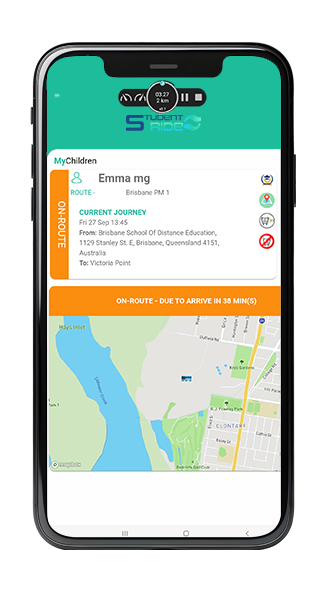
Once the bus starts its run, your dashboard switches to live tracking. You’ll see the bus on a map with an estimated arrival time at your child’s stop, and you’ll receive a notification when your child boards and when they get off.
Getting in Touch
If you need further assistance, feel free to contact a member of the StudentRide team by emailing inaburra@studentride.com.au or calling 02 7502 6585.
Our customer service team is available Monday to Friday between 9 am and 4 pm to assist you with non-urgent inquiries.
Download The App
The StudentRide Parent App is available on both Google Play and the Apple App Store.


Inaburra School Policy
Before making a booking, parents and caregivers must read and accept the full StudentRide Terms & Conditions.
Important – Primary-aged students:
For all students in Primary school, pick up and drop-off is face-to-face only (a parent, caregiver, guardian or Secondary school sibling must be at the bus stop).
Fares are reviewed annually. See Fares & Cut-off Times for current pricing and how changes are communicated.