Scots College Private Bus Service
Supporting safe, reliable travel for our students, this service connects families across the community. View routes, stop locations, and fees.

Dear Scots College Families,
Welcome to the Scots College Transport Parent Portal. From Term 4 2026, all bus travel is booked and paid for in the StudentRide app at the time you book. The College no longer invoices families for bus travel. This platform provides a central place for families to access information on bus routes, stop locations, and pricing.
With helpful tools such as the postcode checker to identify the most convenient stop, the portal has been designed to make arranging your child’s journey to and from the College as simple and flexible as possible.
We are pleased to partner with StudentRide to deliver a transport service that reflects the values of Scots College. With a strong focus on student safety and wellbeing, this technology-enabled system supports a reliable and well-managed experience for families, while contributing to a more efficient and sustainable school journey.
At Scots College, we place importance on providing a supportive and well-connected environment for our students and families. This service forms part of that commitment, helping students travel with confidence as part of their daily routine.
You will find a section below dedicated to frequently asked questions (FAQs). Should you require any further information, whether regarding routes, stops or bookings, please contact the StudentRide transport team at scotscollege@studentride.com.au or call +64 4 887 8876 between 9am – 4pm. A live service team is also available during service times to assist with any urgent enquiries.
Best regards,
Scots College Private Bus Service
Routes, Timetables & Map
Here you will find the routes, stops, and times for Scots College Private Bus Service.
Frequently Asked Questions
Welcome to the Scots College Private Bus Service FAQ section! Here you’ll find answers to some of the most commonly asked questions about our private bus services.
Need more help?
If your question isn’t answered here or you need further assistance, please don’t hesitate to contact our dedicated StudentRide Transport Team. You can reach us by email at scotscollege@studentride.com.au or by phone at +64 4 887 8876.
Scots College Private Bus Service Hours:
Our friendly Transport Team is available to assist you with non-urgent inquiries Monday to Friday, between 9:00 am and 4:00 pm.
How do I register?
To register, open the StudentRide app and tap Register. You’ll be prompted to enter your email address. For security purposes, this email must match the one registered with the school. Once entered, you’ll receive a One-Time Passcode (OTP) via text to your registered mobile number. Enter the code to set up your password and complete the registration process.
My email isn’t working when registering
If your email address doesn’t match the one we have on file, you won’t be able to proceed. Please contact StudentRide at scotscollege@studentride.com.au or call us on +64 4 887 8876 to update your details.
I didn’t receive a 6-digit code when registering my email
If you don’t receive the One-Time Passcode, it’s likely that your mobile number doesn’t match the records we have on file. Please contact StudentRide at scotscollege@studentride.com.au or call us on +64 4 887 8876 to update your details.
Where can I find the bus routes and timetables?
Bus routes and timetables are available on our website. You can view detailed information for each route, including bus stops and departure/arrival times.
What if I would like an additional stop?
Our transport service is flexible and can consider adding additional stops if there is sufficient demand and the proposed stop aligns with current routes. Please don’t hesitate to reach out to us at scotscollege@studentride.com.au for assistance.
What if my child needs different stops or routes during the week?
If your child’s morning and afternoon trips are on different routes (for example, the Prep bus in the afternoon), one Term Pass covers both. Book and pay for one leg in the app, then email scotscollege@studentride.com.au and we’ll add the other leg for you at no extra charge.
If your child uses the same route but needs a different stop on some days, email us and we’ll sort it out with you.
Q: What does the service cost?
| Type of travel | Fare | Paid by card (incl. 3% card fee) |
|---|---|---|
| Pay as you go, all routes except 6 Hutt Valley | $6.80 per trip | $7.00 per trip |
| Pay as you go, 6 Hutt Valley, every stop except Queens Wharf | $12.50 per trip | $12.88 per trip |
| Pay as you go, Queens Wharf (TSB Arena), morning service only | $3.80 per trip | $3.91 per trip |
| Term Pass, all routes except 6 Hutt Valley | $490 | $504.70 |
| Term Pass, 6 Hutt Valley, inbound and outbound | $855 | $880.65 |
A trip means one direction, so a return journey on the same day is two trips. A term pass covers the whole term on that route, both directions. Queens Wharf is a morning service only and has no term pass, so trips from that stop are booked one at a time.
Card payments in the app include a 3% card fee, added at checkout. It covers the processing cost charged on card payments so the College receives the full fare, and it’s set to cover that cost only. For example, a $490 Term Pass paid by card is $490 plus a $14.70 card fee, which comes to $504.70. The College will review the fee at the end of Term 4.
Q: How do I pay?
Bookings are paid for by card in the StudentRide app at the time you book, and the total includes the 3% card fee. The booking isn’t held until it’s paid. For bookings of $300 or more, you can pay by bank transfer instead and avoid the card fee (see below).
Q: Can I pay without the card fee?
Yes, for bookings of $300 or more, such as a Term Pass. Email scotscollege@studentride.com.
Q: Should I choose a Term Pass or Pay as you go?
If your child travels most days, the Term Pass is usually cheaper. If they travel a few days a week or only sometimes, Pay as you go will be. In the app, a Term Pass is booked under Make a regular booking, and Pay as you go trips under Make an ad-hoc booking. A regular booking is always charged at the full Term Pass price, however many days you select, so for part-week or occasional travel, book each trip as an ad-hoc booking instead.
Q: How do I book?
Open the StudentRide app and log in. Tap the menu button, the three lines at the top left. For a Term Pass, tap Make a regular booking, then choose the term, route, stop and travel days, and whether you need morning, afternoon or both. To add the return trip, tap Additional Booking and repeat for the other time slot. For Pay as you go trips, tap Make an ad-hoc booking and pick the dates you need. Pay in the app to confirm.
What if I need to amend my travel arrangements before the start of term?
You can change or cancel your own bookings in the app. If the app won’t let you make the change you need, email scotscollege@studentride.com.au and we’ll help.
Q: How do I cancel a trip?
Cancel it in the app before the cut-off: 11:59pm the evening before for a morning trip, or 2:00pm on the day for an afternoon trip. If you don’t cancel, the driver still comes to your stop and waits. Telling the College office doesn’t change the bus list, as the office can’t see or edit bus bookings.
Q: Do I get a credit if I cancel a trip?
If you cancel a Pay as you go (ad-hoc) booking by 8:00am for a morning trip, or by 3:00pm for an afternoon trip, you’ll receive a credit for the fare towards a future trip. If the app cut-off has passed, cancel by calling us on +64 4 887 8876 or emailing scotscollege@studentride.com.au. To use your credit, get in touch with us and we’ll book the trip for you. The credit covers the fare only, not the card fee, and needs to be used by the end of the school year. There’s no credit if a student doesn’t turn up without cancelling, and term passes aren’t credited for days not travelled.
Q: My child is unwell and it’s past the cut-off.
Call us on +64 4 887 8876. Our live service team is available from an hour before the routes start and can let the driver know.
Q: What if my child gets on the bus without a booking?
If there’s a seat, your child will travel. We’ll record the trip and contact you to arrange payment for it.
Q: When can I book for next term?
Bookings open one term at a time. Term 1 2027 bookings will open once the College confirms routes and fares.
What should I do if the school bus is running late?
While our bus providers work hard to minimise delays, unforeseen circumstances like traffic or roadworks may cause disruptions. If the bus has not arrived, please wait at the designated stop for 10 minutes after the scheduled pick-up time. If the bus still has not arrived after this period, please contact our transport partner, StudentRide, at +64 4 887 8876.
What if my child misses the bus?
To ensure a smooth pick-up, we recommend students arrive at the bus stop at least 10 minutes before the scheduled departure time. Please ensure students wait outside the car at the stop, as buses will not depart before the allocated time. However, if no one is visible at the stop, the driver may proceed.
If your child does miss the bus, parents or guardians will need to arrange alternate transportation to school. Kindly notify our Transport Team at scotscollege@studentride.com.au if this occurs.
Cards for Boarding and Tracking
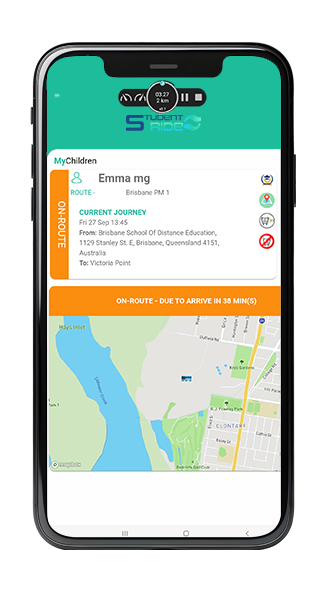
Students will be issued cards for seamless boarding and disembarking. These cards enable real-time tracking of your child’s journey to and from school. Parents will receive accurate updates and notifications through the StudentRide Parent App, providing peace of mind regarding their child’s commute.
Getting in Touch
If you need further assistance, feel free to contact a member of the StudentRide team by emailing scotscollege@studentride.com.au or calling +64 4 887 8876.
Our customer service team is available Monday to Friday between 9 am and 4 pm to assist you with non-urgent inquiries. Once the buses are running, our live service team is on the same number from an hour before the routes start until an hour after they finish.
Download The App
The StudentRide Parent App is available on both Google Play and the Apple App Store.


Scots College Private Bus Service
Before making a booking, parents and caregivers must read and accept the full StudentRide Terms & Conditions.
Please view the complete Terms & Conditions here: Terms & Conditions
Important – Primary-aged students:
For all students in Primary school, pick up and drop-off is face-to-face only (a parent, caregiver, guardian or Secondary school sibling must be at the bus stop).